managed-street Component
The managed-street component manages the creation, updating, and synchronization of one or more street-segments in a 3D environment. It provides a high-level interface for handling street layouts, including support for importing from various data sources and managing street segments.
User Interface
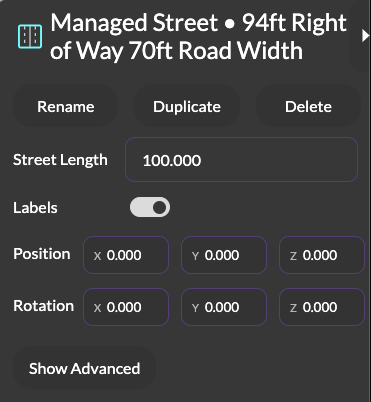
A custom sidebar in 3DStreet Editor allows users to edit a subset of managed-street component properties.
- Street Length: Users can modify the overall length of the street through a numeric input field. This change is propagated to all segments simultaneously.
- Boundaries / Ground / Striping / Vehicles: Toggle controls for showing or hiding boundary segments, the ground slab beneath the street, lane striping, and vehicle/cyclist clones. These are realtime, non-destructive visibility toggles; the content is always generated and kept in the scene.
- Labels: A toggle control to enable or disable street labels for better visualization and identification of segments.
Properties
| Property | Type | Default | Description |
|---|---|---|---|
| length | number | 60 | The length of the street in meters |
| sourceType | string | null | The type of source data (streetmix-url, streetplan-url, or json-blob) |
| sourceValue | string | null | The value corresponding to the sourceType (URL or JSON string) |
| showBoundaries | boolean | true | Show or hide boundary segments (buildings, waterfront, fences). Visibility-only: boundaries are always created when the source has boundary data, and toggling never moves the street |
| showGround | boolean | true | Show or hide the ground slab beneath the street (rendered by the street-ground sibling component) |
| showStriping | boolean | true | Show or hide lane striping generated by street-generated-striping |
| showVehicles | boolean | true | Show or hide vehicle and cyclist clones (identified by their mixin's catalog category) |
| synchronize | boolean | false | When set to true, triggers a refresh from the source |
Boundaries and street layout
The travelled way (all non-boundary segments) is the only input to street layout: centering, the ground plane, and labels ignore boundary segments entirely. Boundary segments render just outside the travelled way's edges based on their side property, regardless of their position in the scene graph or their visibility. Toggling showBoundaries (or hiding a single boundary via the scene graph eye icon) never shifts the street's alignment.
Data Source Support
Streetmix URL
Supports importing street layouts from Streetmix URLs:
<a-entity managed-street="sourceType: streetmix-url; sourceValue: https://streetmix.net/..."></a-entity>
Streetmix import notes:
- Boundaries: The canonical Streetmix schema v34+
boundary.left/boundary.rightobjects ({ variant, floors, elevation }, elevation in meters) are read first, with fallback to the deprecated flatleftBuildingVariant/rightBuildingVariantfields. Boundary segments are always created when the source has boundary data; theshowBoundariesproperty only controls visibility. - Elevation: Streetmix schema v33+ metric elevations are used directly. Pre-v33 integer levels are normalized to meters (
1 level == 0.15 m) on import. - Slope: Coastmix (schema v34) segments with
slope: { on: true, values: [start, end] }import as tilted surfaces (see thestreet-segmentslopeproperties).
Streetplan URL
Supports importing street layouts from Streetplan JSON URLs:
<a-entity managed-street="sourceType: streetplan-url; sourceValue: https://..."></a-entity>
JSON Blob
Supports direct JSON configuration:
<a-entity managed-street="sourceType: json-blob; sourceValue: '{...}'"></a-entity>
JSON Schema
If json-blob sourceType is used, the component expects street data in Managed Street JSON format:
{
  name: string,           // Name of the street
  width: number,         // Total width in meters
  length: number,        // Length in meters
  segments: [{           // Array of segment objects
    type: string,        // Segment type (e.g., 'drive-lane')
    width: number,       // Width in meters
    name: string,        // Display name
    elevation: number,   // Vertical offset in meters (0 = road level, 0.15 = curb)
    direction: string,   // 'inbound', 'outbound', or 'none'
    color: string,       // Hex color code
    surface: string,     // Surface type (e.g., 'asphalt')
    generated?: {        // Optional generated content
      striping?: array,  // Striping configurations
      clones?: array    // Clone configurations
    }
  }]
}
Legacy blobs using the deprecated integer level field or type: "building" still load; they are migrated to elevation / type: "boundary" at parse time.
For additional details on Managed Street JSON, see the full documentation here..
Dependencies
This component automatically adds the following components if they don't exist:
street-alignstreet-groundstreet-label
Events
| Event Name | Description | Event Detail |
|---|---|---|
| segments-changed | Fired when segments are added, removed, or modified | {changeType, property?, segment?, oldValue?, newValue?, added?, removed?} |
Methods
insertSegment(index, type, segmentObject)
Inserts a new street segment at the specified index.
// Example
const street = document.querySelector('[managed-street]');
street.components['managed-street'].insertSegment(0, 'drive-lane', {
  width: 3,
  elevation: 0,
  direction: 'outbound',
  color: '#FFFFFF',
  surface: 'asphalt'
});
Parameters:
index(number): The position to insert the segmenttype(string): The segment type (e.g., 'drive-lane', 'bike-lane')segmentObject(object, optional): Configuration object for the segment
refreshFromSource()
Reloads and parses data from the specified source.
const street = document.querySelector('[managed-street]');
street.components['managed-street'].refreshFromSource();
Notes
- The component automatically handles the positioning and alignment of segments
- Travelled-way segments are automatically centered around the x-axis; boundary segments sit outside the travelled way's edges and do not affect centering
- Width calculations are performed in meters
- The component maintains internal state of managed entities for performance
Known Limitations
- Source URLs must be accessible and return valid JSON
- Some segment types may have limited support for certain features
- The component is currently in beta and APIs may change