Product Update: Custom Asset Uploads, Video-to-Splat, and Bollard Buddy for iOS

Since a major editor panel interface redesign in late April, we've been busy working on a big batch of features focused on getting your own content into 3DStreet: your own 3D models, your own photos and videos turned into 3D, and scenes you capture in AR on your phone. We've also been putting a lot of work into reliability, especially for Managed Streets (procedural street generation), which we're planning to bring out of beta later this summer. Here's what's new.
Custom 3D Asset Uploads
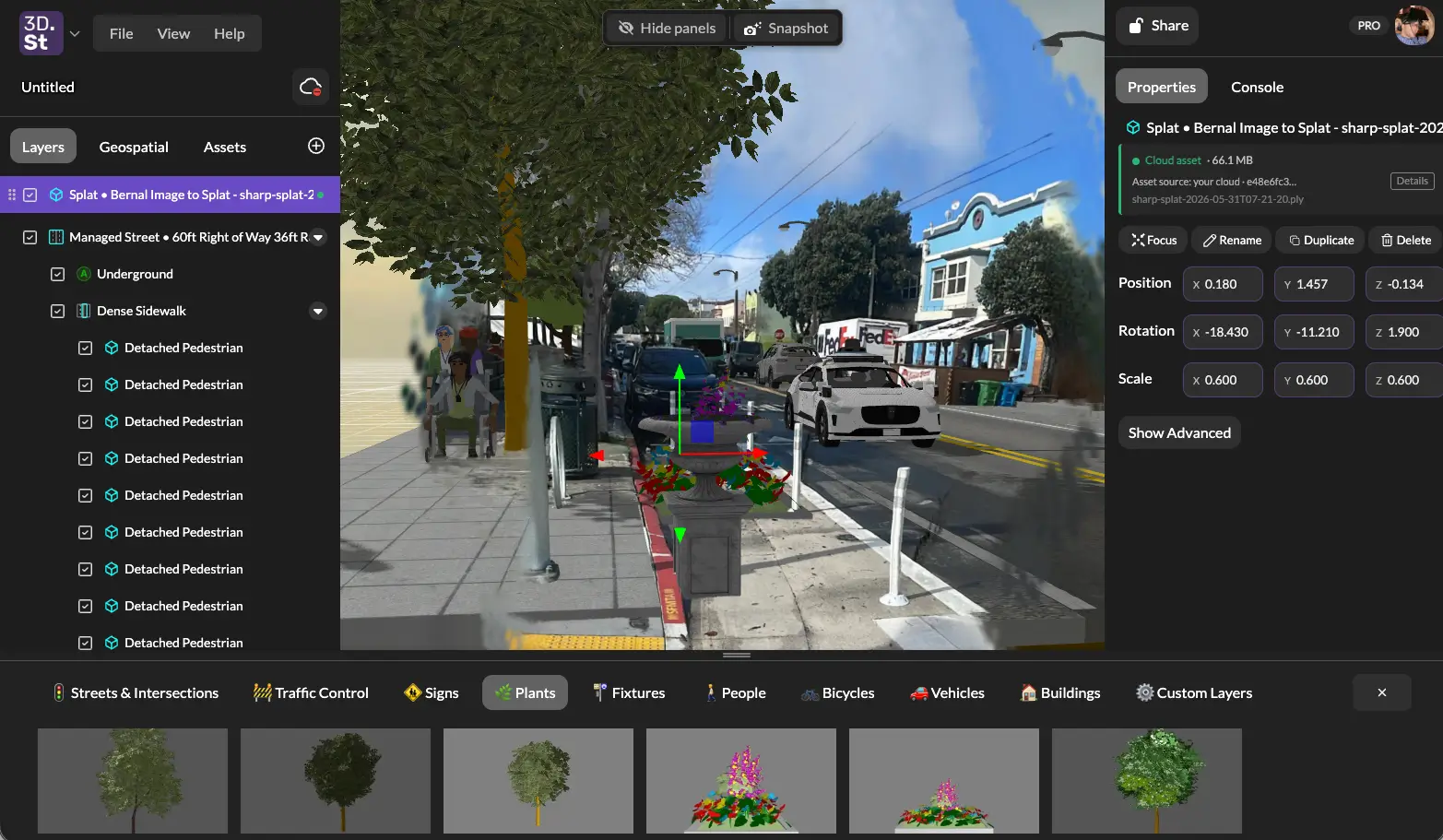
One of our most-requested features is here: you can now upload your own 3D models. Drag and drop a glTF/GLB file straight into the viewport and place it in your scene, with no separate conversion step or need to host the file elsewhere anymore. The Adding Custom Models and Images guide walks through the editor flow.
We built the whole pipeline around making this feel effortless:
- Automatic optimization - Uploads are compressed and optimized on the way in, so large models don't slow down your scene.
- Your assets in one place - Uploaded models live in your Asset System library across the editor and the other 3DStreet apps, without the need for a separate file or web host.
- Automatic attribution - When you drop in a model, 3DStreet reads its embedded metadata and pulls out the title, author, license, and source automatically. It recognizes the standard glTF copyright fields as well as the formats used by popular 3D model libraries like Sketchfab and Poly Pizza, so the credit travels with the model.
This is the foundation for a lot of what follows, including bringing 3D Gaussian splats into your scenes as ordinary, draggable assets.
Image and Video to 3D Gaussian Splat
The AI Generator has a new Splat tab that turns real-world captures into 3D Gaussian splats you can drop right into a scene. There are two ways in:
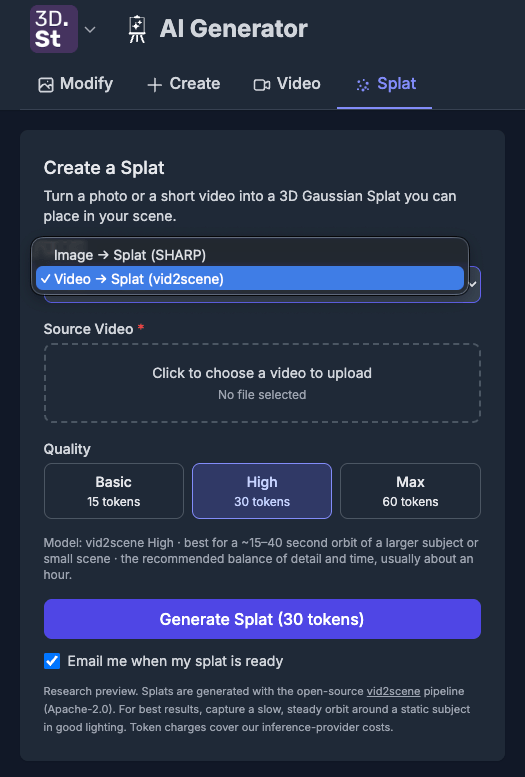
- Image to Splat. A single photo becomes a 3D splat in a few minutes.
- Video to Splat (vid2scene). Record a slow, steady orbit around a subject with your phone and get a full 3D Gaussian splat back. It's built on the open-source vid2scene pipeline, with Basic, High, and Max quality tiers depending on how much detail you want.
Once generated, splats are first-class assets. They save to your gallery, preview in a live 3D viewer, and drag into your scene exactly like any other model. Under the hood we also built a durable generation queue so these longer renders finish reliably even if you close the tab. Your result lands in your gallery when it's ready, and you're only charged once a render succeeds.
An Image-to-Splat result rotating in the viewer — a single photo reconstructed as a fully three-dimensional Gaussian splat.
Splat generation is an early research preview. Results vary with your capture, so steady lighting and a smooth orbit go a long way. We'd love to see what you make.
Bollard Buddy for iOS
Bollard Buddy, our app for placing street-safety objects in augmented reality, is now available as a native iOS app after its official approval and release of v1 in the Apple App Store! Snap a photo of an unprotected bike lane or a wide crossing, drop in bollards, planters, cones, and other calming elements right on the real-world surface in front of you, and capture a before-and-after on the spot.
The iOS app is fully connected to the rest of 3DStreet:
- Scenes you capture in AR now open on the web. We registered the app's full set of placeable street props as 3DStreet catalog entries, so a scene you save on your phone resolves to the correct 3D geometry when you open it on the web, with no missing objects.
- Shared cloud gallery. Photos and scenes captured on iOS show up when you sign in on the web, and the reverse works too.
- Smarter geolocation for AR scenes. When a scene captured in AR is missing precise elevation data, and viewing in the 3DStreet Editor, your design sits correctly on 3D map tiles to geolocate the scene contents and generate further imagery.
Major Reliability Push (and Managed Street Leaving Beta)
We closed 40+ tracked issues this cycle, with a heavy focus on Managed Street, our next generation procedural street generation system, as we prepare to graduate this feature out of beta later this summer.
To get there, we built a strict import comparison tool that puts a legacy-imported street side by side with the same street built as a Managed Street, so we can catch every visual difference and fix it. That work resolved a long list of issues, including:
- Plastic jersey barriers that weren't appearing on managed streets
- Perpendicular and angled parking that was too narrow, causing cars to overlap
- Reversed left/right street lamp orientation
- Parking stencils landing in the wrong part of the lane
- Striping incorrectly drawn across grass medians
- A parklet floor sitting too low to be visible
- Overly uniform default spacing that gave lamps and trees an artificial look
- And so much more OMG this is a lot of work!
Beyond managed streets, we also fixed a long-standing and super frustrating bug where a click meant to orbit the camera could accidentally grab a selected object, sometimes a whole street, and fling it tens of meters away, with undo failing to bring it back. That's now resolved, and undo restores the exact original position every time.
A big thank-you to Vincent Fretin for a steady stream of managed-street and editor fixes throughout this period, and to everyone who took the time to file a bug report. It genuinely makes our day when you share with us how to help you make safer streets with 3DStreet. My favorite user feedback recently was "[3DStreet is] buggy as heck and really hard to use." Points noted, and we're working on it! Keep the feedback coming!
The New Max Plan
We added a new Max plan for power users who are pushing 3DStreet hardest. It's a superset of Pro with 25 GB of storage (up to 5 GB per file) and 500 AI generation tokens per month.
The reason it exists is everything above: custom model uploads and video-to-splat generation are heavier on storage and compute than a typical AI image render, and the largest splat workflows need more headroom than Pro provides. If you're mostly making AI images and street scenes, Pro still has everything you need. Max is there for the folks living in the splat and custom-asset workflows.
Bonus: Drive 3DStreet with AI Agents (MCP)
For the AI fanatics: 3DStreet now speaks MCP (the Model Context Protocol), which lets an AI agent like Claude drive a scene running live in your own browser tab. It can create objects, edit managed streets, move the camera, and take snapshots while you watch. The most exciting new feature is the ability for the AI agent to now be able to "see" the snapshot to create a visual feedback loop when generating scenes.
It's opt-in and stays completely out of the way unless you want it. Install the 3dstreet-mcp helper, open the pairing link it gives you, and your agent connects to the editor through the Console panel. From there you can describe what you want in plain language and watch it build. This is an early, experimental feature aimed at automating repetitive or complex design work, and we're excited to see where the community takes it.
What's Next
We're working down the roadmap, and custom asset uploads and splats were a big one to land. Next up:
- Managed Street at parity to replace legacy Streetmix import
- Camera controls improvement at parity
- Draw on street (Editor)
- Spraypaint on street (Bollard Buddy)
As always, the best way to shape what we build is to tell us what's working and what isn't. Come join us on Discord and keep those bug reports coming.